
The short answer. If your website is a progressive web app, package it as a Trusted Web Activity: Google’s Bubblewrap tool builds a signed APK, and PWABuilder gives you an Android App Bundle for Google Play. If your site is not a PWA, a converter such as Median, Appilix or AppsGeyser wraps it in a WebView. If you need features a website cannot give, build a native Android app on the same backend.
For Google Play, new apps upload an Android App Bundle (AAB), and Google Play generates the APKs for each phone. An APK is what you share directly, outside the store.
APK or AAB: which one do you need?
An APK is the file Android installs. You can send it to people or put it on your website, and they install it directly (sideloading). Android’s developer verification pages confirm: "Your apps can still be sideloaded."
An AAB (Android App Bundle) is what Google Play takes: "From August 2021, new apps are required to publish with the Android App Bundle on Google Play." Google Play uses the bundle "to generate and serve optimized APKs for each device configuration".
So: to share the app yourself, you need an APK. To publish on Google Play, you need an AAB. The routes below produce one or both.
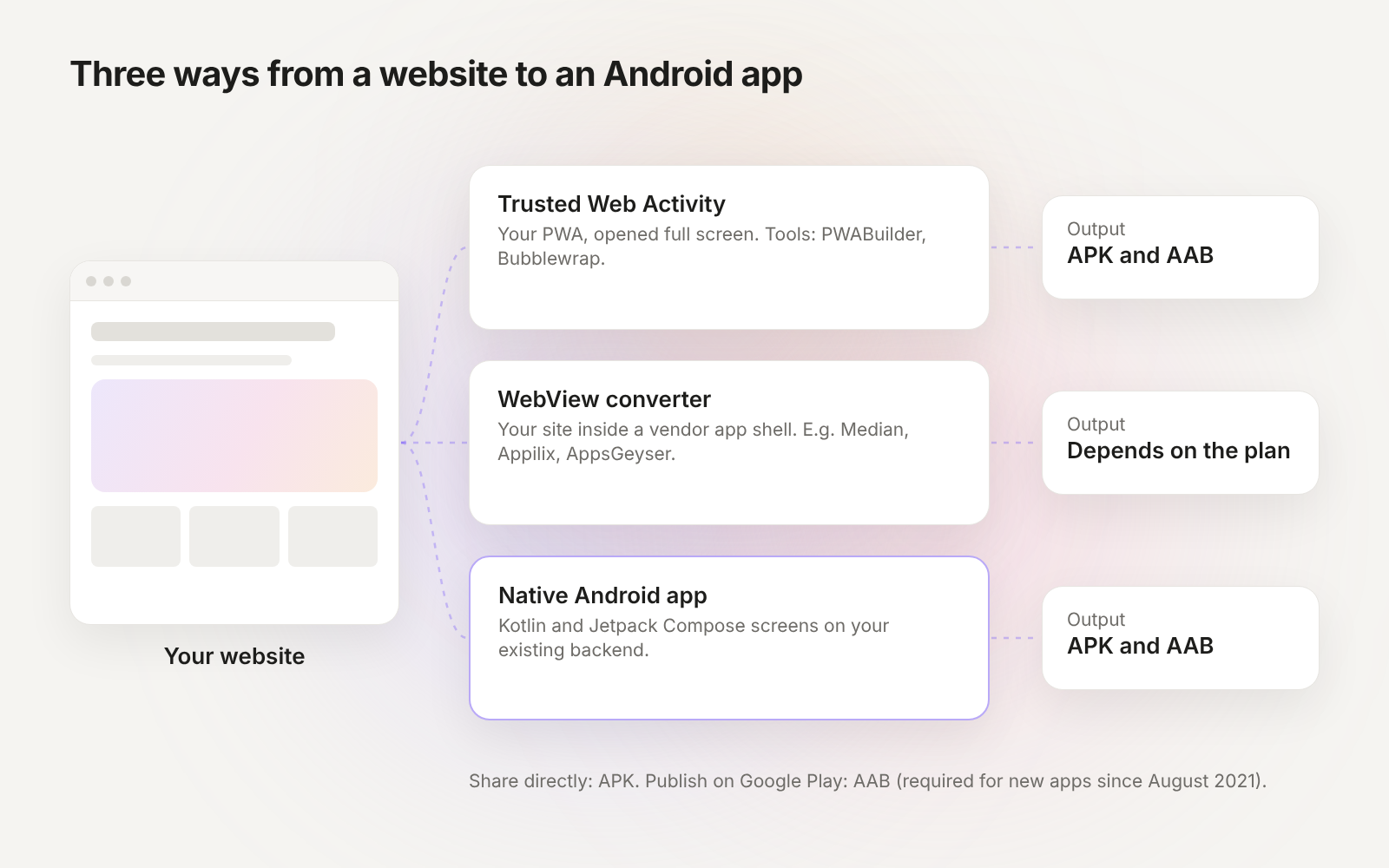
Route 1: Trusted Web Activity (PWABuilder or Bubblewrap)
Android’s docs: "Trusted Web Activity is a new way to open your web-app content such as your Progressive Web App (PWA) from your Android app using a protocol based on Custom Tabs." The site opens full screen in Chrome’s engine, without the browser bar.
What you need. Your site must meet the Add to Home Screen requirements of a PWA (a web app manifest and the PWA basics), and "the app and the site it opens are expected to come from the same developer," verified with Digital Asset Links. You prove it by uploading a file to your website at .well-known/assetlinks.json.
With Bubblewrap (command line). "Bubblewrap is a set of libraries and a command line tool (CLI) for Node.js."
- Install it:
npm i -g @bubblewrap/cli - Start a project from your manifest:
bubblewrap init --manifest=https://your-site.com/manifest.json - Build:
bubblewrap build."The build step outputs a file called app-release-signed.apk."
With PWABuilder (in the browser). PWABuilder is Microsoft’s open-source PWA tool, released under the MIT license, and it uses Bubblewrap to generate the Trusted Web Activity. Its Android package is a ZIP that "contains an .aab (Android App Bundle) file which can be submitted directly to the Play Store", plus the assetlinks.json file for your site and the signing key. Keep the signing key safe: you need it for every update.
Best for: sites that already work well as a PWA and need little beyond the website.
Route 2: A WebView app from a converter
A WebView shows web pages inside an Android app. Android’s docs describe it as a view that "displays web content you control inline where you want a high degree of flexibility in customizing or updating the UI." Converter services build that app for you from your URL.
Prices on the vendors’ own pages, read 5 November 2026:
Median.co. "Starting at $0 for Self-Serve Free", which covers building and testing in the browser. Full-Service Agency starts at $7,200 and Enterprise at $18,000. The page does not state the price of publishing on the self-serve plan.
Appilix. A free plan lets you "build your first Android app for free and explore core features for 15 days." "Publishing to the Play Store or App Store requires a paid plan." Android Standard is $119 and Android Premium $229, as one-time payments.
AppsGeyser. "Start for free with our no-code app maker." Paid plans are $58, $98 and $238 a month.
Check the price on the vendor’s page before you pay; they change often. More converters are compared in website to app converters and Median alternatives.
Google Play rules for WebView apps. The Spam policy does not allow apps whose primary purpose is to provide a webview of a website without permission from the website owner or administrator
, and the Limited Functionality policy says: "We do not allow apps that only have limited functionality and content." A WebView of your own site is allowed by the first rule; add app features, such as notifications or offline screens, for the second.
Route 3: A native Android app on the same backend
A native Android app draws its screens with Kotlin and Jetpack Compose instead of loading the website. It keeps your backend (Supabase, Firebase or your own API) and your users’ accounts, and it can use notifications, the camera, offline data and home screen widgets the way other Android apps do. The website keeps running for web users.
You can build it in Android Studio yourself, hire an Android developer, or use a tool that writes the native code. In Modaal, paste your website’s URL or its Git repo on Website to app. Modaal writes a migration plan you review, and your own AI agent builds Jetpack Compose screens for Android and SwiftUI screens for iPhone from one project. Modaal runs on a Mac.
Best for: apps people open every day, apps with logins and data, and apps that have to pass store review as an app in their own right.
Sharing an APK without Google Play in 2026
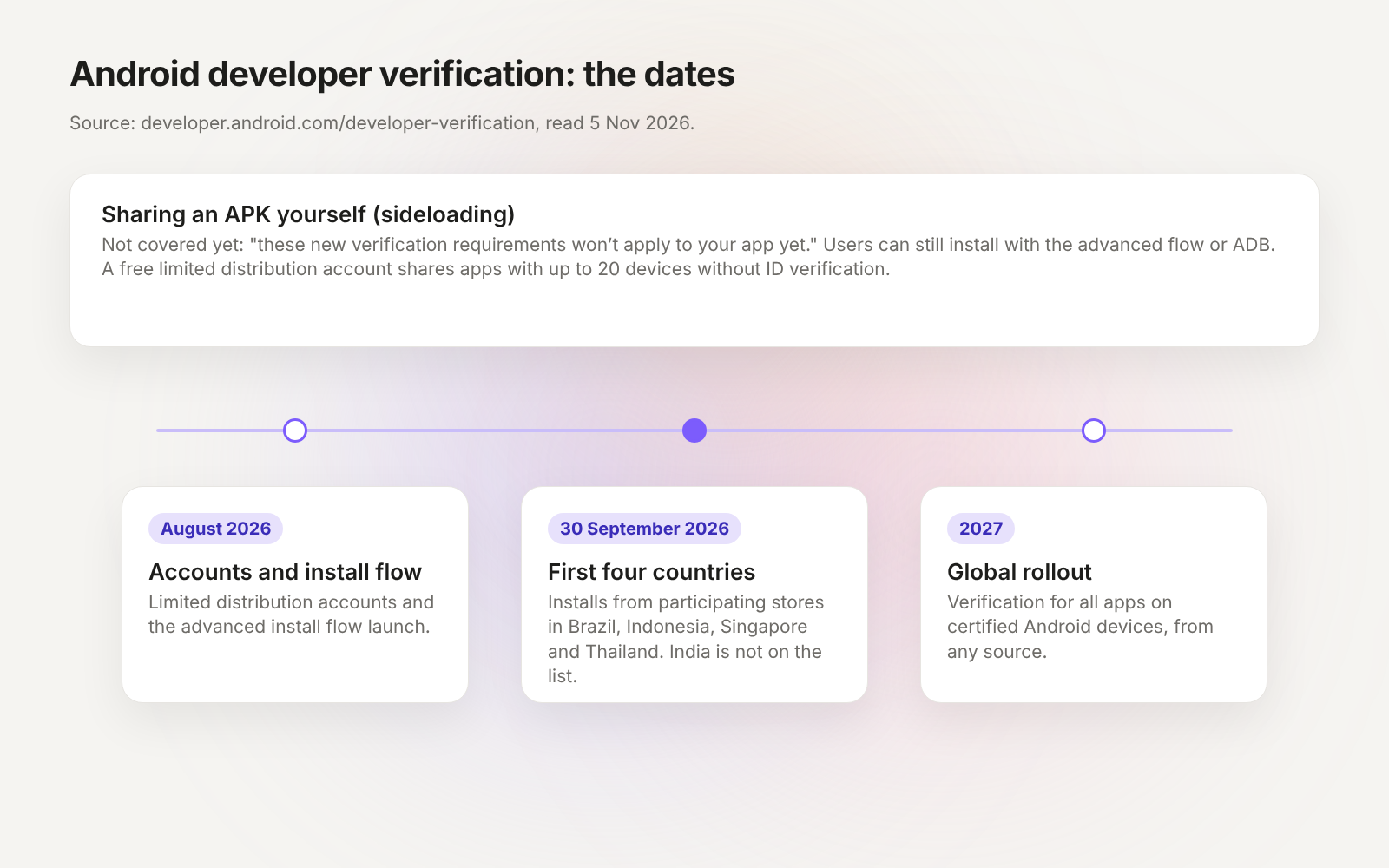
Android is adding developer verification: apps on certified Android devices must come from verified developers. What it means for an APK you share yourself:
Today. Android’s FAQ: "If you distribute your app through other stores, or if users sideload your app directly, these new verification requirements won’t apply to your app yet."
Since 30 September 2026. Protections apply to installs from participating stores "in Brazil, Indonesia, Singapore, and Thailand on certified devices running Android 7+." India is not on that list.
In 2027. "Verification capability will be expanded globally for all apps on certified Android devices in 2027." From then on, the rules apply "regardless of your app’s download source."
What you can do now. A free limited distribution account lets you "share apps with up to 20 specific devices for testing and personal use at no cost and without ID verification." For wider distribution, the full distribution account costs $25. Users can still install unregistered apps through an advanced flow (developer mode, a one-time one-day wait, then Install Anyway) or with ADB.
Publishing the app on Google Play
Whichever route you take, Google Play asks for the same things: a developer account with a US$25 one-time fee, an Android App Bundle that targets Android 16 (API level 36), a store listing, a privacy policy and the Data safety form. New personal accounts created after 13 November 2023 must also run a closed test with at least 12 testers for 14 days before the first public release. Every step is in how to publish an app on Google Play.
Three routes from a website to an Android app
| Route | What is on the phone | What you need | Cost stated on the vendor page | Output |
|---|---|---|---|---|
| Trusted Web Activity | Your site full screen, opened through Chrome’s Custom Tabs protocol | A PWA that meets Add to Home Screen requirements; assetlinks.json on your site | PWABuilder and Bubblewrap: tool price not stated (PWABuilder code is MIT-licensed); Google Play US$25 once | Bubblewrap: signed APK. PWABuilder: AAB for Google Play |
| WebView converter | Your site inside a WebView in the vendor’s app shell | Your URL and an account with the vendor | Median: from $0 (Self-Serve Free). Appilix: $119 or $229 once. AppsGeyser: $58–$238 a month | Depends on the vendor and plan |
| Native Android app | Screens in Kotlin and Jetpack Compose, on your existing backend | The website or its code as the reference; Android Studio, a developer or a tool | Depends on the tool or developer; Google Play US$25 once | APK and AAB from Android Studio |
Android and Chrome documentation and vendor pricing pages, read 5 November 2026. Re-check vendor prices before you pay.
Keep reading
- How to publish an app on Google Play
Account, 12 testers, listing and review.
- Website to app converters
The converters compared, with prices.
- How to turn a website into an app
PWA, wrapper or native rebuild, for iPhone and Android.
- PWA vs native app
What a web app can do on a phone.
Want a real Android app, not your website in a frame?
Import your website’s URL or repo. Your own AI agent builds Jetpack Compose for Android and SwiftUI for iPhone from one project, on the backend you already have.