Comparison
A Bitrig alternative with no daily cap
These are the two closest products in the category — both Mac apps, both running the coding agent you already pay for, both writing real Swift into real Xcode projects. Both have a free tier. The difference is what happens on your eleventh prompt of the day.
The short version
Bitrig is very good, and we would rather say so than pretend otherwise. It is built by people who co-created SwiftUI, and its coverage of the Apple platform surface — widgets, Live Activities, Controls, Shortcuts, watchOS, tvOS, visionOS — goes deeper than ours. If you are building an Apple-only app and want every corner of the platform, that is a real argument for Bitrig.
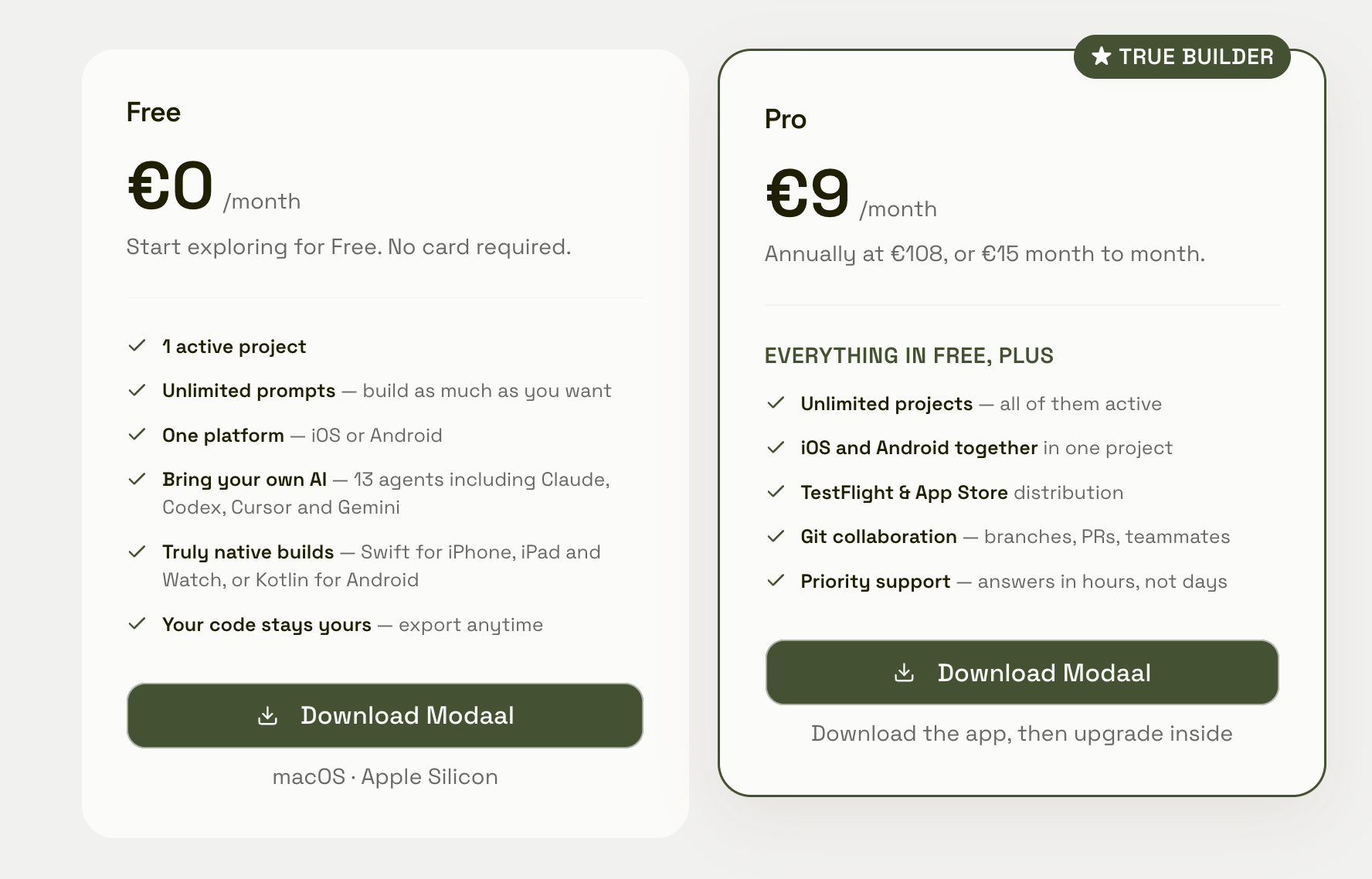
Three specific reasons to choose Modaal. No usage cap on Free: Bitrig's free tier gives you 10 requests and 15 credits a day, capped at 60 credits a month; Modaal Free has no prompt limit at all. Android exists: Bitrig is Apple-only by design, with none planned; Modaal Free builds iOS or Android, and Pro builds both together. Pro costs €9 a month billed annually, against Bitrig's $25.
One thing we will not claim: Bitrig does not publish a project limit on its free tier, and Modaal Free is capped at one active project. If you want several projects running at once without paying, check theirs — we genuinely do not know.
Free tier, side by side
Verified against both products’ own pricing pages, August 2026.
| Modaal Free | Bitrig Free | |
|---|---|---|
| Prompt / request limitThe difference you feel on day one. | None. Unlimited prompts, no caps. | 10 daily requests, plus 15 daily credits capped at 60 per month |
| Active projects | 1 | Not stated on their pricing page |
| Platforms | One of your choice — iOS or Android | Every Apple platform. No Android. |
| Native output | Real Swift and SwiftUI, real Xcode project | Real Swift and SwiftUI, real Xcode project |
| Bring your own agent | Claude Code, Codex, Cursor, OpenCode, Gemini CLI, GitHub Copilot, Auggie, Cline, Goose, Kilo Code, Mistral Vibe, OpenHands and Qwen Code | Claude Code, Codex, Cursor, Grok Build, OpenCode |
| Code export | Any time. There is no export step — the project is already on your disk. | "Export your code at any time" |
| App Store distribution | Pro | Pro |
And on Pro
| Modaal Pro | Bitrig Pro | |
|---|---|---|
| PriceLarger Bitrig credit tiers are sold as in-app purchases under a different plan name. | €9 / month billed annually (€15 monthly) | $25 / month on the web |
| Usage metering | None | 200 monthly credits, consumed "based on the complexity of the task", rollover one month |
| Projects | Unlimited | Not stated |
| Both platforms | iOS and Android together, from one shared core | Apple only |
| Apple platform breadth | iPhone, iPad, Apple Watch | iPhone, iPad, Watch, TV, Vision Pro, Mac, widgets, Live Activities, Controls, Siri, Spotlight |
| App Store submission | TestFlight and App Store distribution | Managed — archives, signing, upload, screenshot capture |
| Automated UI testing | Build-and-fix loop through Xcode; scaffolds a passing test suite | Agentic UI testing — taps, scrolls and types like a user |
| Collaboration | Git collaboration | Not stated |
| Build from a phone | No | Bitrig Remote — iPhone driving your Mac. TestFlight beta, iOS 26. |
| Documented architecture | RIBs module tree with protocol boundaries on the production template; MVVM for prototypes | Not documented |
Which one you actually want
| If you | We recommend | Why |
|---|---|---|
| You want to evaluate properly, without paying | Modaal | Ten requests a day is roughly one focused hour. You will hit it on your first real afternoon, and hit it again every day until you either pay or give up. Modaal Free has no prompt cap — you can build until you are genuinely done, and decide about Pro when you want to ship. |
| Your app will need Android | Modaal | Bitrig is Apple-only as a deliberate product choice, with no Android announced. If Android is on the roadmap at all, building iOS in a tool that cannot follow you means rebuilding later. Modaal Free builds either platform; Pro builds both together from one shared core. |
| You are Apple-only and live in widgets, Live Activities and the Watch | Bitrig | Their platform coverage is deeper than ours and their founders co-created SwiftUI. If your product concept depends on Controls, Shortcuts, Siri, Spotlight or visionOS, they will get you there faster. |
| You want several projects going at once, for free | Check Bitrig | Modaal Free is one active project. Bitrig does not publish a project limit on its free tier, so it may well be more generous here. We would rather point you at it than pretend the limit is not there. |
| You want a managed App Store submission | Bitrig | Bitrig handles archives, code signing, upload, listing management and screenshot capture. Modaal Pro gives you TestFlight and App Store distribution, but you drive more of it yourself. |
| The app is a business that will outlive its first architecture | Modaal | Modaal commits to a structure and holds the agent to it — an explicit RIBs module tree with protocol boundaries, so the navigation graph stays legible as features accumulate. Bitrig does not document an equivalent commitment. This matters less in month one than in month six. |
Two products that agree about almost everything
It is worth stating how much these tools have in common, because the marketing in this category tends to obscure it.
Both are macOS apps. Both drive real Xcode and produce real Xcode projects. Both moved to bring-your-own-agent, so you authenticate with a Claude or ChatGPT subscription you already pay for rather than buying inference through a vendor — Bitrig through the Agent Client Protocol with Claude Code, Codex, Cursor, Grok Build and OpenCode; Modaal with those and several more. Both let you export. Both now have a free tier, and both keep App Store distribution for paying customers.
Both are also right about the same underlying thing: a native app should be a native project you own, not a build artifact you rent. If you are choosing between these two, you have already made the important decision.
What ten requests a day actually feels like
This is the difference that shows up first, so it is worth being concrete.
Bitrig Free gives you "10 daily requests using your Claude or ChatGPT subscription" and "15 daily credits (up to 60 per month)". Requests run against the AI subscription you are already paying for. Credits are Bitrig's own, consumed "based on the complexity of the task."
Ten requests is somewhere around an hour of real work. Not an hour of demo — an hour of the actual loop, where you ask for a screen, look at it, ask for a change, hit a build error, ask about the build error, and go round again. Debugging is where prompts disappear fastest, and debugging is also where a cap hurts most: you start rationing attempts at exactly the moment you need to try things freely.
Modaal Free has no prompt cap. Not a high one — none. You can spend a Saturday on it and never see a limit.
We can do that because of how the product is built rather than out of generosity. Modaal does not buy inference. You bring your own agent and authenticate with your own subscription, and Modaal orchestrates it locally against Xcode on your own machine. A free user costs us very little, so there is no reason to meter them. Bitrig bundles its own credits alongside your subscription, which is a legitimate design — it just means someone has to pay for those credits, and on the free tier that is done by capping you.
The limit we do have
Modaal Free is one active project. If you want to keep three apps going at once without paying, Free will not do it and Pro is €9 a month billed annually.
Bitrig's pricing page does not state a project limit on its free tier. We are not going to guess at what that means — if running several projects for free matters to you, go and check theirs. It is a fair question and we would rather you got an accurate answer than a flattering one.
What we would say is that one active project is the shape most people actually need while evaluating a tool. You are trying to find out whether this thing can build your app. One project, unlimited prompts, real native output and code you can take away is a genuine answer to that question.
Android, and why it is a fork in the road
Bitrig builds for Apple platforms and only Apple platforms. That is not an oversight — it is a coherent product decision, and it is part of why their Apple coverage is as deep as it is. Focus buys you something real.
But it means that if Android arrives on your roadmap, Bitrig cannot follow. You start a second codebase, in a second tool, with a second workflow, and then spend your time reconciling two products that were never designed together.
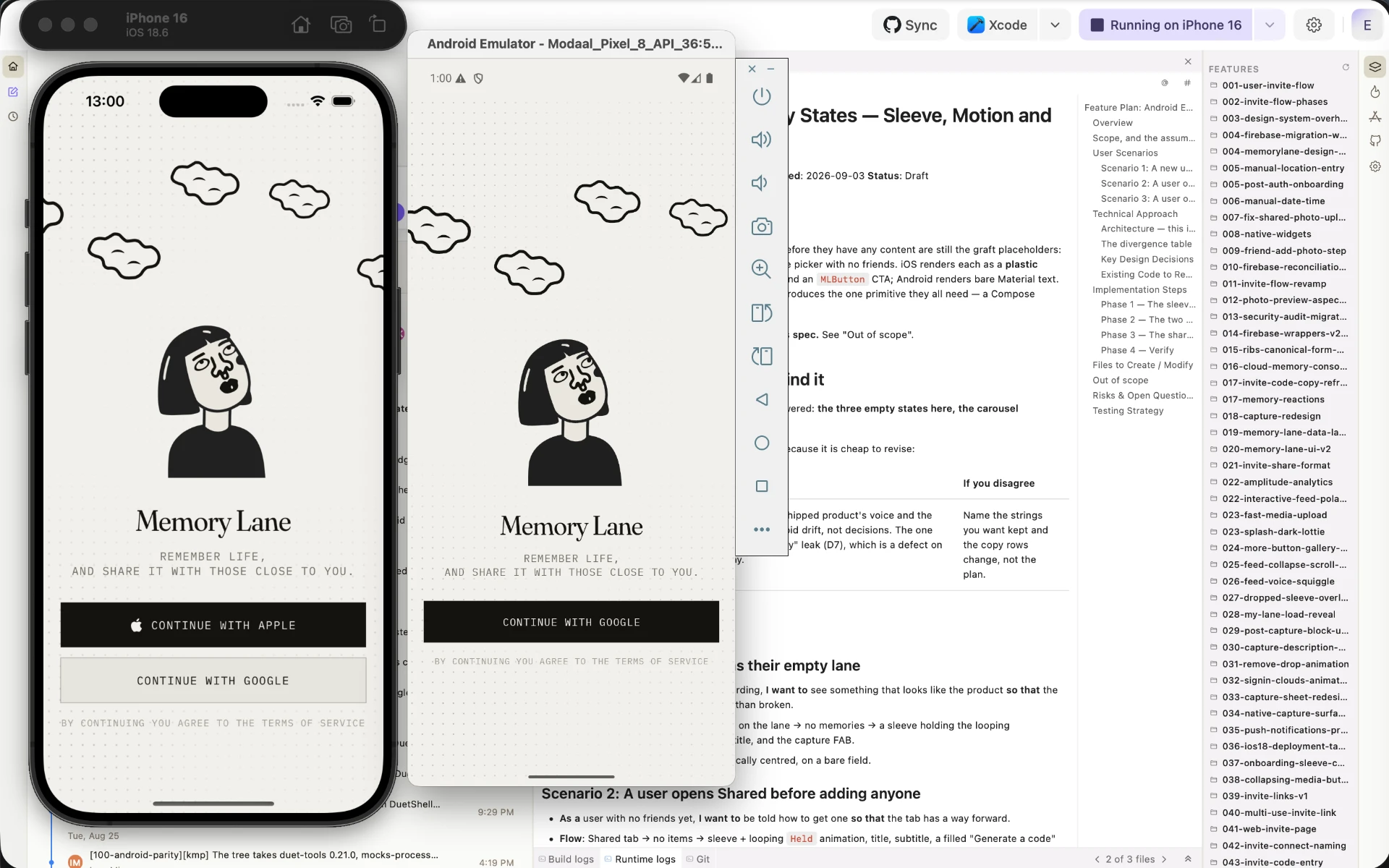
Modaal Free lets you pick either platform. Pro builds both together, from a shared core, with native Kotlin and Compose on Android and Swift and SwiftUI on iOS — so the business logic is the same on both sides while each app follows its own platform's conventions. If you are honestly unsure whether Android will ever matter, that uncertainty is itself the argument.
What happens at feature fifty
Both tools produce good code early. The question that decides whether a project survives is what the codebase looks like once an agent that does not remember last week has added fifty features to it.
Modaal answers this explicitly. The production template scaffolds a RIBs module tree — Uber's architecture pattern — with an explicit module hierarchy, protocol boundaries between every module, and a navigation tree that is explicit in the router hierarchy. Because the structure is on disk rather than in a conversation, it survives context clears, agent switches and a three-week gap. The quick-prototype template uses MVVM instead, deliberately smaller, keeping view models unit-testable.
Worth knowing before you start: migrating from MVVM to RIBs is a full rewrite, not a refactor. Choose the production template if the app might become real.
Bitrig's documentation does not describe an equivalent architectural commitment. That does not mean the code it writes is bad — given who built it, it very likely is not. It means the guarantee is different in kind: theirs rests on the quality of the generation, ours on a structure the agent has to write into.
What Bitrig does better, plainly
We would rather you got this from us than found it out afterwards.
Platform depth. Widgets, Live Activities, Controls, Shortcuts, Siri, Spotlight, CloudKit, tvOS, visionOS, macOS. If your app lives in those corners, Bitrig has more of the surface covered.
Managed submission. Archives, code signing, upload, listing management and screenshot capture, handled for you.
Agentic UI testing. Bitrig tests the apps it builds by tapping, scrolling and typing like a user. Modaal runs a build-and-fix loop through Xcode and scaffolds a passing test suite, which is a narrower thing.
Bitrig Remote. Driving a build from your phone is genuinely novel and we have nothing like it.
The founders. Kyle Macomber and Jacob Xiao co-created SwiftUI. Tim Donnelly has an Apple Design Award. That is not a marketing line and it is reasonable to weigh it.
If those matter more to you than an uncapped free tier, Android, and a €9 Pro plan, Bitrig is the better choice and you should take it.
Frequently asked questions
Yes. Modaal Free gives you one active project, unlimited prompts with no caps, your choice of iOS or Android, bring-your-own-AI with Claude Code, Codex, Cursor, OpenCode, Gemini CLI, GitHub Copilot, Auggie, Cline, Goose, Kilo Code, Mistral Vibe, OpenHands and Qwen Code, genuinely native Swift builds for iPhone, iPad and Apple Watch, and code you can export at any time. No card, no countdown. Pro is €9 a month billed annually and adds unlimited projects, iOS and Android together, TestFlight and App Store distribution, Git collaboration and priority support.
Bitrig’s pricing page lists 10 daily requests using your own Claude or ChatGPT subscription, plus 15 daily credits capped at 60 per month, with credits consumed based on task complexity. Native Swift builds and code export are included. App Store and TestFlight distribution require Pro at $25 per month.
Because Modaal does not buy inference. You bring your own agent and authenticate with a Claude, ChatGPT or other subscription you already pay for, and Modaal orchestrates it locally against Xcode on your own machine. A free user costs us very little, so there is no reason to meter one. Tools that bundle their own credits have a real cost per user, which is why they cap free accounts.
One active project, one platform at a time, and no App Store or TestFlight distribution — those are Pro. Everything else is uncapped. If you want several apps going at once or want to ship to the store, that is what Pro is for.
No. Bitrig builds for Apple platforms only — iOS, iPadOS, watchOS, tvOS, visionOS and macOS — with no Android support or announced roadmap. Modaal Free builds iOS or Android, and Pro builds both together from a shared core.
Yes, both are bring-your-own-agent. Bitrig supports Claude Code, Codex, Cursor, Grok Build and OpenCode through the Agent Client Protocol. Modaal supports Claude Code, Codex, Cursor, OpenCode, Gemini CLI, GitHub Copilot, Auggie, Cline, Goose, Kilo Code, Mistral Vibe, OpenHands and Qwen Code. The difference is that Bitrig also consumes its own credits alongside your subscription, while Modaal does not meter at all.
Yes. Both generate genuine Swift and SwiftUI in real Xcode projects and both let you export, on their free tiers included. With Modaal there is no export step at all, because the project lives on your own disk from the first build.
If you are Apple-only and want managed App Store submission and the deepest platform coverage, Bitrig. If you want to build without watching a daily counter, might need Android, or want the cheaper paid plan, Modaal. Both need a Mac, so that is not a differentiator.
Related
- 19 AI App Builders Compared: Web, Mobile, Native (2026)19 AI app builders in one table — web, mobile and native — compared by what each actually ships, with pricing from their own pages, dated.
- Rork Alternatives: Native iOS Without Rork MaxRork Max is $200/mo for native iOS. Rork Free is 35 credits and web apps only. Modaal builds a real native Swift app free, unlimited prompts, Pro €9/month.
- Bubble Alternative for Native Mobile Apps (2026)Bubble’s native mobile is React Native and in public beta, and Bubble states apps cannot be exported as code. If you came to Bubble for a mobile app, here are your options.
Native iPhone and Android apps. Start free.
One project, two native apps: Swift for iPhone, Kotlin for Android.