Guide · every rule quoted from Apple’s App Review Guidelines with its section number, read 14 September 2026
App Store rejection reasons in 2026: the rules that catch AI-built apps, quoted
App Review rejects apps against a numbered document, the App Review Guidelines, and the rejection message names the section. This page takes the sections that AI-built apps run into — completeness, metadata, minimum functionality, spam, login, purchases, privacy, APIs — quotes Apple’s sentence for each, describes what the violation looks like when an agent wrote the app, and gives the action to take before you press Submit. No rejection statistics appear here; Apple publishes none, and the guideline text is what the reviewer applies.
Verified
How a rejection arrives. After you upload a build and submit it in App Store Connect, App Review installs it, uses it, reads the metadata, and either approves it or sends a message in App Store Connect that cites one or more guideline sections by number. The message tells you which section; the guideline tells you what it means; this page tells you what it looks like in an app an agent wrote and what to change.
Apple’s own summary of the document is one sentence: “The guiding principle of the App Store is simple—we want to provide a safe experience for users to get apps and a great opportunity for all developers to be successful.” Everything below is a specific case of that sentence. If you are still building, read how to make an iPhone app first; this page is for the week before submission and the day after a rejection.
2.1 App Completeness: crashes, placeholders, and the demo account
The rule. “We will reject incomplete app bundles and binaries that crash or exhibit obvious technical problems.” And: “Submissions to App Review, including apps you make available for pre-order, should be final versions with all necessary metadata and fully functional URLs included; placeholder text, empty websites, and other temporary content should be scrubbed before submission.” For apps with accounts, 2.1(a): “Provide App Review with full access to your app. If your app includes account-based features, provide either an active demo account or fully-featured demo mode…”
What it looks like in an AI-built app. A “Lorem ipsum” string the agent left in an empty state. A Settings row that says “Coming soon”. A support URL that points at a domain you have not bought. A crash on first launch on a device the simulator never showed you — an iPhone SE, a phone set to a non-English locale, a phone with no network. A login wall with no test account in the App Review notes, so the reviewer sees the login screen and nothing else.
Before you submit. Search the project for the strings “lorem”, “TODO”, “coming soon”, “placeholder”, “test” and “example.com”; ask the agent to list every user-visible string and read the list. Run the release build on a physical phone with Wi-Fi off, then with the language set to one you do not speak. Fill in the App Review notes with a working test account and the three steps to reach the main feature. Set the support URL and privacy URL to pages that exist.
2.3 Accurate Metadata: the listing must show the app
The rule. “Customers should know what they’re getting when they download or buy your app, so make sure all your app metadata, including privacy information, your app description, screenshots, and previews accurately reflect the app’s core experience…” On screenshots, 2.3.3: “Screenshots should show the app in use, and not merely the title art, login page, or splash screen.” On hidden features, 2.3.1(a): “Don’t include any hidden, dormant, or undocumented features in your app; your app’s functionality should be clear to end users and App Review.” And 2.3.10: “…don’t include names, icons, or imagery of other mobile platforms or alternative app marketplaces in your app or metadata…”
What it looks like in an AI-built app. Screenshots generated from a mockup rather than the running app, showing a feature that was cut. A description written from the press release, listing three features when version 1 ships one. A feature flag the agent added and left off, with the code still in the bundle. An Android phone frame in the App Store screenshots because the design tool defaulted to it.
Before you submit. Take the screenshots from the build you are submitting, on a device or simulator, after the feature works. Rewrite the description from the app, not from the plan. Ask the agent: “List every feature flag, debug menu and disabled screen in the project” and remove them or ship them. Check every image in the listing for a non-Apple device frame.
4.2 Minimum Functionality: the section AI-built apps meet most
The rule. “Your app should include features, content, and UI that elevate it beyond a repackaged website.” And: “If your App doesn’t provide some sort of lasting entertainment value or adequate utility, it may not be accepted.” Three sub-rules apply directly. 4.2.2: “Other than catalogs, apps shouldn’t primarily be marketing materials, advertisements, web clippings, content aggregators, or a collection of links.” 4.2.3: “Your app should work on its own without requiring installation of another app to function.” 4.2.6: “Apps created from a commercialized template or app generation service will be rejected unless they are submitted directly by the provider of the app’s content.”
What it looks like in an AI-built app. A single-screen app that shows information available on a website. A wrapper around a web page — the route native app vs web app describes — with nothing the browser could not do. An app whose screens are the builder’s default template with the name changed. A “companion” that opens another app for every action.
On 4.2.6 specifically. The sentence names “a commercialized template or app generation service” and permits such apps only when “submitted directly by the provider of the app’s content.” The line is between an app built with a tool and an app that is the tool’s template with your logo on it. You are the provider of your app’s content when the app’s screens, data model and behaviour are yours; a plan you wrote and approved, with a design system you specified, is the evidence of that. The builder pages on best no-code mobile app builders list which tools produce a shared template and which produce a project of your own.
Before you submit. Write one sentence: “This app lets a person do X, which they cannot do on a web page because Y.” If Y is empty, the app is at risk under 4.2 whatever tool built it. Add the one platform capability that makes Y true — offline data, a widget, notifications tied to the user’s own data, the camera — before submission, not after the rejection.
4.3 Spam: not another one of those
The rule. 4.3(a): “Don’t create multiple Bundle IDs of the same app…” — Apple’s example is a separate map app for every city. 4.3(b): “Don’t submit apps that are indistinguishable from what’s already widely available.”
What it looks like in an AI-built app. The agent is asked for “a habit tracker” and produces the median habit tracker: the same onboarding, the same streak screen, the same three colours. The category already holds hundreds. Nothing in the listing or the first screen says why this one.
Before you submit. Go back to the one-page description you wrote before the first prompt — the subheading that names the person and the one thing they get — and put that sentence on the first screenshot and in the first line of the description. If you never wrote that page, the requirements template forces the question. If the answer is “it is the same but mine”, 4.3(b) is the section that will be cited.
4.8 and 5.1.1(v): login only when needed, Apple’s sign-in when others are offered, deletion always
The rules. 5.1.1(v): “If your app doesn’t include significant account-based features, let people use it without a login.” 4.8: “Apps that use a third-party or social login service … must also offer as an equivalent option another login service with the following features:” — the features Apple lists are the ones Sign in with Apple provides. And 5.1.1(v) again: “If your app supports account creation, you must also offer account deletion within the app.”
What it looks like in an AI-built app. The agent adds an auth flow on prompt one because most sample projects have one, so a local notes app opens on a login screen. A “Continue with Google” button with no Apple option beside it. An account you can create and never delete, because deletion was not in the plan.
Before you submit. Ask: does the app need an account to do its one thing? If not, remove the login or make it optional. If it uses Google, Facebook or another third-party login, add Sign in with Apple as an equal option. Add an account-deletion path in Settings that removes the data, and test it.
3.1.1 and 3.1.2: purchases through Apple, subscriptions with ongoing value
The rules. 3.1.1: “If you want to unlock features or functionality within your app, (by way of example: subscriptions, in-game currencies, game levels, access to premium content, or unlocking a full version), you must use in-app purchase.” 3.1.2(a): “If you offer an auto-renewable subscription, you must provide ongoing value to the customer, and the subscription period must last at least seven days and be available across all of the user’s devices.”
What it looks like in an AI-built app. A Stripe checkout for the Pro tier because the agent reused a web pattern. A paywall that references products that do not exist in App Store Connect yet, so the reviewer sees an empty price. A “lifetime” subscription. A subscription that unlocks a one-time export.
Before you submit. Route every digital unlock through StoreKit. Test purchases before the products exist in App Store Connect with a local StoreKit configuration file — Modaal lists every .storekit file in the project under Run Options and writes the choice into the Xcode scheme, and the same page’s pre-ship checklist applies to any builder: handle transactions, derive entitlement from the purchase state rather than a stored “is premium” flag, and validate in sandbox on a real device. Create the products in App Store Connect and attach them to the submission before you submit the build.
5.1.1: the privacy policy link and consent
The rules. 5.1.1(i): “All apps must include a link to their privacy policy in the App Store Connect metadata field and within the app in an easily accessible manner.” 5.1.1(ii): “Apps that collect user or usage data must secure user consent for the collection…”
What it looks like in an AI-built app. An analytics SDK the agent added by default, with no consent step and no mention in the privacy answers. A privacy URL that 404s. A camera permission prompt whose purpose string says “This app needs camera access.”
Before you submit. Ask the agent to list every third-party SDK and every network call that leaves the device; answer the App Privacy questions in App Store Connect from that list. Publish a privacy policy page and link it from both the listing and a Settings row. Write each permission purpose string as the reason in the user’s words: “To photograph your receipt so the items can be listed.”
2.5.1 and 4: public APIs, current OS, and the design bar
The rules. 2.5.1: “Apps may only use public APIs and must run on the currently shipping OS.” Section 4’s opening line: “Apple customers place a high value on products that are simple, refined, innovative, and easy to use, and that’s what we want to see on the App Store.” For health-adjacent apps, 1.4.1: “Medical apps that could provide inaccurate data or information, or that could be used for diagnosing or treating patients may be reviewed with greater scrutiny.”
What it looks like in an AI-built app. A private API the agent found in an old forum answer. A build against last year’s SDK. Tap targets too small to hit, text that clips at the largest accessibility size, a tab bar with seven tabs. A calorie or symptom app that states medical conclusions.
Before you submit. Build against the current Xcode and SDK; ask the agent to grep for underscore-prefixed or undocumented selectors. Run a design audit — spacing, contrast, tap targets, consistency, motion — on every screen; Modaal’s design-prompts page has the copy-paste prompts, and the list works in any tool. Turn on the largest Dynamic Type size and open every screen. If the app touches health, remove diagnostic language and add the sources for any figure it shows.
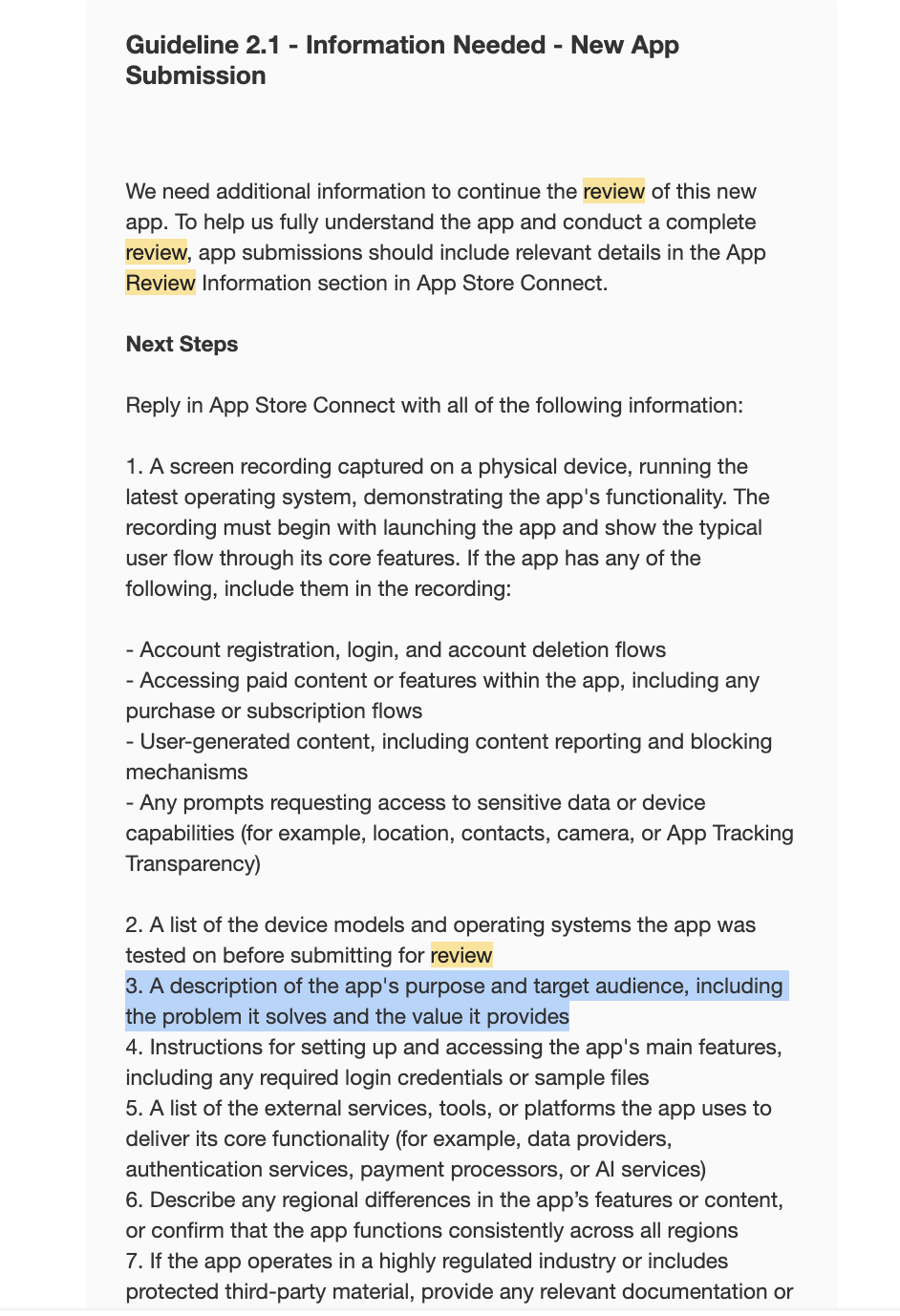
A rejection I had not seen in a hundred submissions
This block is Ivan Misuno, Modaal’s co-founder, in his own words. The reading of App Review’s intent is his; Apple has not stated it.
I’ve submitted more than 100 apps myself, for my own portfolio and for clients, and I’ve seen different types of rejection, but this is what we got recently. It is written in a way like Apple is trying to filter simple, 3–4 screen AI-generated apps and rejecting them with no reason, just to test if you have these obvious things in place.
What to do the day after a rejection
Read the section number, then the guideline, then the message. The message is a paraphrase; the guideline is the rule. Open the cited section on Apple’s page and read the whole subsection, not only the sentence quoted here.
Reply in App Store Connect before you rebuild. If the reviewer misunderstood the app — the test account did not work, the feature is on the second tab — say so in the thread, with the steps. If the reviewer is right, say what you changed and upload the new build.
Change one thing at a time. A rejection for 4.2 is not fixed by adding a settings screen; it is fixed by the one capability that makes the app more than a web page. A rejection for 2.1 is fixed by the crash, the placeholder or the demo account, not by a redesign.
Ask the agent for the audit, not the fix. “List every place in this project that could violate guideline 5.1.1(ii)” gives you a list to act on. “Fix the rejection” gives you a guess.
If you disagree, appeal. App Store Connect offers an appeal path for a rejection you believe is wrong; use it with the guideline text and your evidence, not with a description of how much work the app was.
The sections, the symptom in an AI-built app, and the action before submission
| Guideline | Apple’s sentence (short) | Symptom in an AI-built app | Before you submit |
|---|---|---|---|
| 2.1 | “binaries that crash or exhibit obvious technical problems” | Crash on a device the simulator never showed | Release build on a real phone, Wi-Fi off, non-English locale |
| 2.1 | “placeholder text, empty websites, and other temporary content should be scrubbed” | “Lorem ipsum”, “Coming soon”, example.com | Grep the strings; read every user-visible string |
| 2.1(a) | “provide either an active demo account or fully-featured demo mode” | Login wall, no test account in the notes | Working test account + three steps in App Review notes |
| 2.3 / 2.3.3 | “Screenshots should show the app in use” | Screenshots from a mockup of a cut feature | Screenshots from the submitted build |
| 2.3.1(a) | “Don’t include any hidden, dormant, or undocumented features” | Feature flags and debug menus left in the bundle | List and remove every flag and disabled screen |
| 4.2 | “elevate it beyond a repackaged website” | One screen of website content; a wrapper | One platform capability the browser cannot do |
| 4.2.6 | “commercialized template or app generation service” | The builder’s template with your logo | Your own plan, screens, data model, design system |
| 4.3(b) | “indistinguishable from what’s already widely available” | The median app in a crowded category | The named person and the one thing, on screenshot 1 |
| 4.8 / 5.1.1(v) | “let people use it without a login” | Login on prompt one; Google-only sign-in; no deletion | Optional login; Sign in with Apple; deletion in Settings |
| 3.1.1 / 3.1.2 | “you must use in-app purchase” | Stripe for a Pro tier; missing products; “lifetime subscription” | StoreKit; products created in App Store Connect; local .storekit test |
| 5.1.1(i)(ii) | “link to their privacy policy … secure user consent” | Default analytics SDK, 404 privacy URL | SDK list → App Privacy answers; live policy page; consent step |
| 2.5.1 | “only use public APIs and must run on the currently shipping OS” | A private selector from an old forum post | Current SDK; grep for undocumented calls |
Quotes from Apple’s App Review Guidelines, developer.apple.com/app-store/review/guidelines, read 14 September 2026. The symptom and action columns are ours.
Frequently asked questions
Apple does not publish rejection statistics, so this page does not rank them. The sections AI-built apps run into are 2.1 (completeness), 2.3 (metadata), 4.2 (minimum functionality), 4.3 (spam), 4.8 and 5.1.1(v) (login and account deletion), 3.1.1 (in-app purchase) and 5.1.1 (privacy); each is quoted above.
Apple’s sentence: “Your app should include features, content, and UI that elevate it beyond a repackaged website,” and “If your App doesn’t provide some sort of lasting entertainment value or adequate utility, it may not be accepted.” The fix is a capability the browser cannot offer — offline data, notifications on the user’s data, the camera, a widget — not more screens.
The rule rejects apps “created from a commercialized template or app generation service” unless “submitted directly by the provider of the app’s content.” An app whose screens, data model and behaviour are yours, submitted by you, is your content; a builder’s shared template with your logo is the case the rule describes. Which tools produce which is listed on the no-code builders page linked above.
If the app uses a third-party or social login such as Google or Facebook to set up the primary account, 4.8 requires an equivalent option with the features Apple lists, which Sign in with Apple provides. If the app has no significant account features, 5.1.1(v) says to let people use it without a login at all.
Not to unlock features or content inside the app: 3.1.1 requires in-app purchase for “subscriptions, in-game currencies, game levels, access to premium content, or unlocking a full version.” Physical goods and services outside the app are a different case; read 3.1.3 on Apple’s page.
With a local StoreKit configuration file in the Xcode scheme. Modaal lists every .storekit file in the project under Run Options and writes the choice into the scheme; the same file works from Xcode with ⌘R. Validate in sandbox on a real device before submission.
A working test account if there is a login, the three steps to reach the main feature, anything the reviewer needs to see it work (a sample QR code, a test address), and a one-line statement of what the app does that a web page cannot. 2.1(a) asks for “full access to your app.”
Read the cited section on Apple’s page, then reply in the App Store Connect thread: either the steps the reviewer missed, or the change you made and the new build number. Change the one thing the section names. If you believe the rejection is wrong, use the appeal path with the guideline text and evidence.
Keep reading
- How to make an iPhone app in 2026
The path from idea to TestFlight, before this page.
- App requirements document template
The document that answers 4.2 and 4.3 before the reviewer asks.
- Native app vs web app
What “beyond a repackaged website” means in capabilities.
- Best no-code mobile app builders
Which builders produce a shared template and which produce your own project.
- Add in-app purchases and subscriptions to an iOS app
Local StoreKit testing and the pre-ship checklist.