Guide · Apple documentation quoted, read 9 October 2026
What is TestFlight? How a team and its clients test an iPhone app before release
TestFlight is Apple’s service for installing a test version of your app on real iPhones before it is in the App Store. It is where your team checks each build and where clients see the app for the first time. This guide covers how it works, who can test, and the limits Apple sets.
Verified
The short answer. TestFlight lets you send a build of your app to testers, who install it with Apple’s TestFlight app. Up to 100 people on your App Store Connect team can test as internal testers; up to 10,000 others can test as external testers, by email invite or a public link. The first build you send to external testers is reviewed by Apple. Each build stays available for 90 days. You need a paid Apple Developer Program membership.
What is TestFlight?
TestFlight is part of App Store Connect, Apple’s system for publishing apps. You upload a build of your app once; from there it can go to testers through TestFlight, or to the App Store for release. Apple describes it as making it “easy for testers to give feedback on your apps, games, and App Clips across Apple platforms before you publish.”
For a team, TestFlight answers a practical question: how does everyone who is not building the app get it on their phone? The product manager, the designer, the client and the first beta users all install it from the same place.
Do you need a paid Apple Developer account for TestFlight?
Yes. TestFlight distribution needs an Apple Developer Program membership, which costs 99 USD per year. Testers do not need one: they need an Apple ID and the TestFlight app. Setting up an Apple Developer account walks through the enrolment.
How does TestFlight work?
1. Create the app in App Store Connect. The app record holds the name and the bundle ID that every build uses.
2. Upload a build. A build is archived in Xcode (or by a tool that runs Xcode for you) and uploaded to App Store Connect.
3. Create tester groups. Apple: “Create groups for testers, then assign specific builds to them.” For example: Team, Client, Beta users.
4. Invite testers. Internal testers are added from your App Store Connect team; external testers by email or with a public link.
5. Collect feedback. Testers send feedback from the TestFlight app or by taking a screenshot inside your app; you read it in App Store Connect.
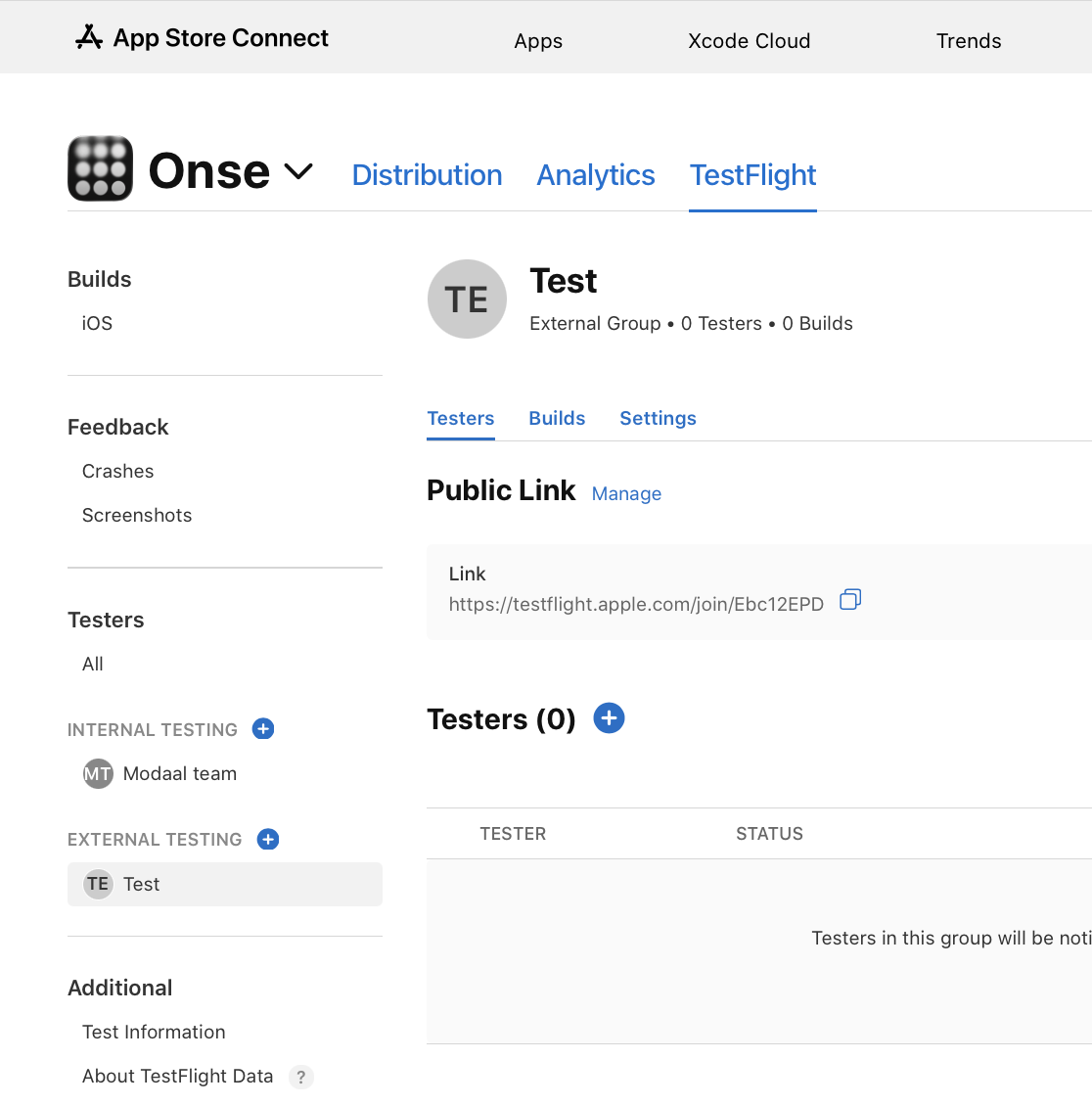
Internal vs external testers: who is who on a team?
Internal testers are people on your App Store Connect team. Apple: “Designate up to 100 members of your development team who hold the Account Holder, Admin, App Manager, Developer, or Marketing role as beta testers.” On a product team that is usually the product manager, the designer and the engineers. Builds reach them without an App Review step.
External testers are everyone else: clients, their staff, beta users. Apple: “You can also invite up to 10,000 external testers to join your beta program.” They do not need access to App Store Connect.
For agency work, the client’s team is usually external, unless the app is published from the client’s own Apple account and they add themselves there.
How do you invite external TestFlight testers?
By email. Add the tester’s email address to a group; they receive an invitation and open it in the TestFlight app.
With a public link. Apple: “Include a public link in your marketing communications — such as email, social media, and more — to invite people to test your beta build.” You can set criteria for the link to limit how many people join.
Does Apple review TestFlight builds?
Only for external testers, and only fully for the first build. Apple: “When you add the first build of your app to a group, the build gets sent to App Review”, and “A review is required only for the first build. Subsequent builds may not require a full review.” Internal testers can install builds without that review.
Plan for the review before the first client demo: send the first build to an external group early, so later builds reach the client without waiting.
How long do TestFlight builds last?
90 days. Apple: “You can test a build for up to 90 days.” After that the build stops working on testers’ phones. Teams that build often never reach the limit, because a newer build replaces the old one first.
What feedback can TestFlight testers send?
Testers on recent versions of TestFlight “can submit feedback either through the TestFlight app or by taking a screenshot directly within your beta app.” The screenshot and the comment arrive in the TestFlight Feedback section of App Store Connect, with the device and the build attached. For a team, that means design comments from a client arrive with the exact screen they refer to.
Is there TestFlight for Android?
No. TestFlight is Apple-only. Google Play has internal testing, internal app sharing, closed testing and open testing instead. TestFlight for Android compares them.
TestFlight at a glance
| Internal testers | External testers | |
|---|---|---|
| Who | Your App Store Connect team (Account Holder, Admin, App Manager, Developer, Marketing roles) | Anyone with an Apple ID |
| How many | Up to 100 | Up to 10,000 |
| How they join | Added from your team | Email invite or public link |
| Apple review | No | First build reviewed; later builds may not need a full review |
| Build lifetime | 90 days | 90 days |
| Typical people | Product manager, designer, engineers | Clients, beta users |
From Apple’s TestFlight page and App Store Connect Help, read 9 October 2026.
Frequently asked questions
TestFlight has no separate fee, but it needs an Apple Developer Program membership, which costs 99 USD per year. Testers pay nothing and install the free TestFlight app.
Up to 100 internal testers from your App Store Connect team and up to 10,000 external testers.
Only for external testers: the first build added to an external group is reviewed. Later builds may not need a full review. Internal testers do not need a reviewed build.
90 days from upload. After that, testers need a newer build.
Yes. Add the client as an external tester by email or send a public link. They install the TestFlight app and then your build.
Not as a long-term replacement: builds expire after 90 days, external testers are capped at 10,000, and the app is not listed in the App Store.
Native iPhone and Android apps. Start free.
One project, two native apps: Swift for iPhone, Kotlin for Android.
Keep reading
- TestFlight for Android
The Google Play equivalents, compared.
- How to publish an app on the App Store
From TestFlight to release.